

- Introduction
- A/B System Architecture for OTA update
- Adding RAUC to the Yocto Build
- Preparing U-Boot
- Kernel Support Required by RAUC
- Adding RAUC and uboot tools to the Image
- Building the A/B SD Card Layout
- Enabling U-Boot Environment Access from Linux
- Installing fw_env.config into the Root Filesystem
- Checking the RAUC Installation
Introduction
This article describes the integration of RAUC for A/B update using a Yocto Kirkstone-based Linux system running on an Orange Pi Zero. The implementation uses a classic A/B root filesystem layout:
- rootfs-A is the currently active system.
- rootfs-B is the inactive system and receives the next update.
- U-Boot selects the appropriate slot during boot.
- RAUC installs updates into the inactive slot.
- U-Boot tracks boot attempts and allows the system to recover from an unsuccessful update.
The resulting system provides a foundation for reliable OTA or locally delivered software updates.
A/B System Architecture for OTA update
The target storage layout uses an SD card containing the U-Boot environment, a shared boot partition, and two root filesystem slots.
                 SD card / eMMC
┌──────────────────────────────────────────┐
│ U-Boot / SPL                             │
├──────────────────────────────────────────┤
│ p1  U-Boot environment     8 MiB         │
├──────────────────────────────────────────┤
│ p2  boot                    16 MiB       │
│     /boot.scr                            │
├──────────────────────────────────────────┤
│ p3  rootfs-A               512 MiB       │
│     Linux + DTB                          │
├──────────────────────────────────────────┤
│ p4  rootfs-B               512 MiB       │
│     Linux + DTB                          │
└──────────────────────────────────────────┘
The important separation is:
| Partition | Purpose |
|---|---|
| p1 | Persistent U-Boot environment |
| p2 | Common boot script |
| p3 | RAUC slot A |
| p4 | RAUC slot B |
The two root filesystem partitions form the RAUC A/B update slots. Only one is active at a time.
The boot partition is shared between the two slots and contains the boot script used by U-Boot.
Adding RAUC to the Yocto Build
The first step is to add the meta-rauc layer to the Yocto project.
From the Yocto directory:
cd poky/
git clone -b kirkstone https://github.com/rauc/meta-rauc.git
Then add the layer to the build:
cd build/
bitbake-layers add-layer ../meta-rauc
Verify the layer is visible:
bitbake-layers show-layersThe RAUC layer provides the RAUC recipe and the Yocto integration required to build RAUC as part of the image.
Preparing U-Boot
RAUC’s uboot bootloader integration requires U-Boot to maintain persistent environment variables.
The following U-Boot configuration options are required:
ENV_IS_IN_EXT4=y
ENV_IS_IN_MMC=y
ENV_EXT4_INTERFACE="mmc"
ENV_EXT4_DEVICE_AND_PART="0:1"

CMD_FAT=y
CMD_SOURCE=y
CMD_SAVEENV=y
CMD_SETEXPR=y
These options provide the U-Boot functionality required to access and modify the persistent environment and execute the boot script.
The bootloader must also be able to load the boot script from the FAT boot partition.
U-Boot Boot Script
The standard boot flow needs to be replaced with a boot script capable of selecting between the A and B root filesystem slots.
The boot script uses U-Boot environment variables such as:
BOOT_ORDER
BOOT_A_LEFT
BOOT_B_LEFT
The basic algorithm is:
             ┌─────────────────┐
             │   BOOT_ORDER    │
             └────────┬────────┘
                      │
                      ▼
             ┌─────────────────┐
             │ Check slot A/B  │
             │ validity        │
             └────────┬────────┘
                      │
                      ▼
             ┌─────────────────┐
             │ Select first    │
             │ valid slot      │
             └────────┬────────┘
                      │
                      ▼
             ┌─────────────────┐
             │ Decrement boot  │
             │ attempts        │
             └────────┬────────┘
                      │
                      ▼
             ┌─────────────────┐
             │ Save U-Boot     │
             │ environment     │
             └────────┬────────┘
                      │
                      ▼
             ┌─────────────────┐
             │ Boot selected   │
             │ slot            │
             └─────────────────┘
This mechanism allows the bootloader to abandon a slot when its available boot attempts are exhausted and fall back to another valid slot. The boot script can initially be created as boot.cmd in meta-orangepi-zero/recipes-bsp/u-boot/files/ with cantent below:
# RAUC U-Boot A/B boot script
#
# Partition layout:
#
#   mmc 0:1 = U-Boot environment
#   mmc 0:2 = boot partition containing boot.scr
#   mmc 0:3 = rootfs A
#   mmc 0:4 = rootfs B
#
# RAUC boot names:
#   A -> mmc 0:3
#   B -> mmc 0:4

test -n "${BOOT_ORDER}" || setenv BOOT_ORDER "A B"
test -n "${BOOT_A_LEFT}" || setenv BOOT_A_LEFT 3
test -n "${BOOT_B_LEFT}" || setenv BOOT_B_LEFT 3

setenv bootargs
setenv bootpart
setenv raucslot

for BOOT_SLOT in "${BOOT_ORDER}"; do
    if test -n "${bootargs}"; then
        # A valid slot was already selected.
        # Ignore remaining entries in BOOT_ORDER.
    elif test "x${BOOT_SLOT}" = "xA"; then
        if test 0x${BOOT_A_LEFT} -gt 0; then
            echo "RAUC: Found valid slot A, ${BOOT_A_LEFT} attempts remaining"

            setexpr BOOT_A_LEFT ${BOOT_A_LEFT} - 1

            setenv bootpart 3
            setenv raucslot A

            setenv bootargs "console=ttyS0,115200 root=/dev/mmcblk0p3 rootwait rauc.slot=A"
        fi
    elif test "x${BOOT_SLOT}" = "xB"; then
        if test 0x${BOOT_B_LEFT} -gt 0; then
            echo "RAUC: Found valid slot B, ${BOOT_B_LEFT} attempts remaining"

            setexpr BOOT_B_LEFT ${BOOT_B_LEFT} - 1

            setenv bootpart 4
            setenv raucslot B

            setenv bootargs "console=ttyS0,115200 root=/dev/mmcblk0p4 rootwait rauc.slot=B"
        fi
    fi
done

if test -n "${bootargs}"; then
    saveenv

    echo "RAUC: Loading kernel from mmc 0:${bootpart}"

    if ext4load mmc 0:${bootpart} 0x46000000 /boot/zImage; then

        echo "RAUC: Loading device tree from mmc 0:${bootpart}"

        if ext4load mmc 0:${bootpart} 0x49000000 /boot/sun8i-h2-plus-orangepi-zero.dtb; then

            echo "RAUC: Starting slot ${raucslot}"

            bootz 0x46000000 - 0x49000000

        fi
    fi

    echo "RAUC: Failed to load slot ${raucslot}"

else
    echo "RAUC: No valid slot found"
    echo "RAUC: Resetting boot attempts to 3"

    setenv BOOT_A_LEFT 3
    setenv BOOT_B_LEFT 3

    saveenv

    reset
fi

echo "RAUC: Boot failed"
reset
Generating boot.scr in Yocto
The image recipe can generate boot.scr automatically using mkimage.
In:
recipes-core/images/core-image-orangepi.bbconfigure the boot files:
#Replace previous value of IMAGE_BOOT_FILES
IMAGE_BOOT_FILES = "boot.scr"
The boot script can then be generated with a custom task:
FILESEXTRAPATHS:prepend := "${THISDIR}/files:"

do_generate_boot_scr() {
    echo ">>> Generating RAUC boot.scr"
    install -d ${DEPLOY_DIR_IMAGE}
    ${STAGING_BINDIR_NATIVE}/mkimage \
        -A arm \
        -T script \
        -C none \
        -n "Orange Pi Zero RAUC boot script" \
        -d ${THISDIR}/files/boot.cmd \
        ${DEPLOY_DIR_IMAGE}/boot.scr
}

do_generate_boot_scr[depends] += "u-boot-tools-native:do_populate_sysroot"

addtask generate_boot_scr before do_image_wic after do_rootfs
The dependency on u-boot-tools-native ensures that mkimage is available when the image is generated.
Loading boot.scr from the Boot Partition
The bootloader is configured to load boot.scr from partition 2.
For example boot.scr can be loaded from bootcmd.cfg that contains:
CONFIG_BOOTCOMMAND="fatload mmc 0:2 0x42000000 /boot.scr; source 0x42000000"Kernel Support Required by RAUC
RAUC may need kernel support for mounting and accessing update bundles.
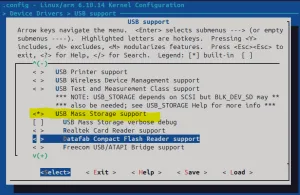
In this configuration, the following kernel features are enabled.
- For USB storage support:
CONFIG_USB=y
USB_EHCI_HCD=y
USB_OHCI_HCD=y
USB_STORAGE=y- Loop-device support is also required:
CONFIG_BLK_DEV_LOOP=y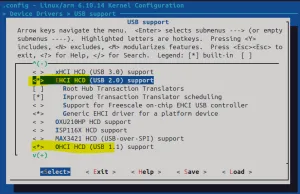
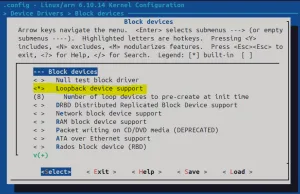
Without loop-device support, RAUC can fail while mounting a bundle.
For example, the following error was observed:
root@orangepi-zero:/tmp/mntu# rauc install orangepi-zero-v2.raucb
installing 0%
Installing 0%
Determining slot states 10%
Determining slot states done. 10%
Checking bundle 10%
Verifying signature 20%
Verifying signature done. 20%
Checking bundle done. 100%
Installing failed.
LastError: Failed mounting bundle: Failed to open /dev/loop-control: No such file or directory
Installing /tmp/mntu/orangepi-zero-v2.raucb failed
This indicates that the kernel does not provide the required loop-device infrastructure.
Adding RAUC and uboot tools to the Image
The image must contain RAUC and the tools required to access the U-Boot environment from Linux.
in core-image-orangepi.bb add:
IMAGE_INSTALL:append = " rauc libubootenv-bin"libubootenv-bin provides fw_printenv and fw_setenv. These utilities allow Linux userspace to inspect and modify the persistent U-Boot environment.
Building the A/B SD Card Layout
The WKS file defines the final storage layout.
The desired layout is:
┌──────────────────────────────┐
│ U-Boot                       │
├──────────────────────────────┤
│ p1  uboot-env       8 MiB    │
├──────────────────────────────┤
│ p2  boot           16 MiB    │
│     /boot.scr                │
├──────────────────────────────┤
│ p3  rootfs-A       512 MiB   │
│     /boot/zImage             │
│     /boot/*.dtb              │
├──────────────────────────────┤
│ p4  rootfs-B       512 MiB   │
│     /boot/zImage             │
│     /boot/*.dtb              │
└──────────────────────────────┘
The corresponding WKS entries are:
part --source rawcopy --ondisk mmcblk0 --align 8 --no-table --sourceparams="file=u-boot-sunxi-with-spl-orangepi-zero-2022.01-r0.bin,seek=8,bs=1024"

part --ondisk mmcblk0 --fstype=ext4 --label uboot-env --size=8M

part /boot --source bootimg-partition --ondisk mmcblk0 --fstype=vfat --label boot --active --align 1024 --size=16M

part / --source rootfs --ondisk mmcblk0 --fstype=ext4 --label rootfs-A --align 1024 --fixed-size 512M

part --source rootfs --ondisk mmcblk0 --fstype=ext4 --label rootfs-B --align 1024 --fixed-size 512M
The critical part of the design is that the two root filesystem partitions are independent RAUC slots.
Enabling U-Boot Environment Access from Linux
For RAUC’s U-Boot integration to work correctly, Linux needs to know where the persistent U-Boot environment is stored.
Create:
meta-orangepi-zero/
└── recipes-bsp/
    └── libubootenv/
        ├── libubootenv_%.bbappend
        └── files/
            └── fw_env.config
The configuration file contains:
/dev/mmcblk0 0xF0000 0x10000The values correspond to the U-Boot configuration:
CONFIG_ENV_SIZE=0x10000
CONFIG_ENV_OFFSET=0xF0000
If you’re not sure about the values, they can be collected from U-Boot build configuration:
grep -R "CONFIG_ENV_OFFSET\|CONFIG_ENV_SIZE\|CONFIG_ENV_SECT_SIZE" \
    tmp/work/orangepi_zero-poky-linux-gnueabi/u-boot/1_2022.01-r0/build/.config

aj@aj-ese:~/Desktop/yocto/poky/build$ grep -R "CONFIG_ENV_OFFSET\|CONFIG_ENV_SIZE\|CONFIG_ENV_SECT_SIZE" tmp/work/orangepi_zero-poky-linux-gnueabi/u-boot/1_2022.01-r0/build/.config
CONFIG_ENV_SIZE=0x10000
CONFIG_ENV_OFFSET=0xF0000
Installing fw_env.config into the Root Filesystem
Create:
meta-orangepi-zero/recipes-bsp/libubootenv/libubootenv_%.bbappendwith:
FILESEXTRAPATHS:prepend := "${THISDIR}/files:"

SRC_URI += "file://fw_env.config"

do_install:append()
{
    install -d ${D}${sysconfdir}

    install -m 0644 ${WORKDIR}/fw_env.config \
        ${D}${sysconfdir}/fw_env.config
}
The resulting target filesystem contains /etc/fw_env.config.
After rebuilding the package and image:
bitbake libubootenv -c clean
bitbake libubootenv
bitbake u-boot
bitbake linux-custom
bitbake rauc

bitbake core-image-orangepi -c clean
bitbake core-image-orangepi
On the target, the U-Boot environment can then be tested with fw_printenv and modified with fw_setenv.
Checking the RAUC Installation
After booting the new image, RAUC can report the current system and slot state:
rauc statusFor more detailed information:
rauc status --detailedA correctly configured A/B system should report information similar to:
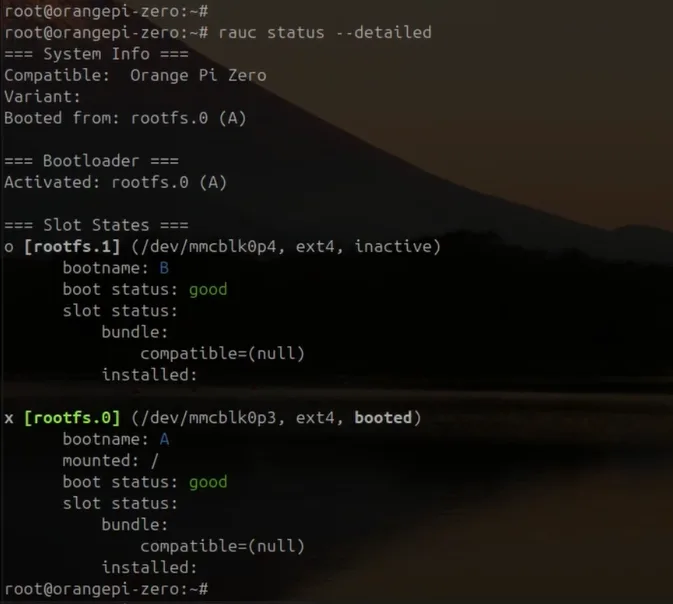
This confirms that RAUC sees both root filesystem partitions as slots and knows which slot is currently active.


Leave a Reply